
Which EHR for Small Practice
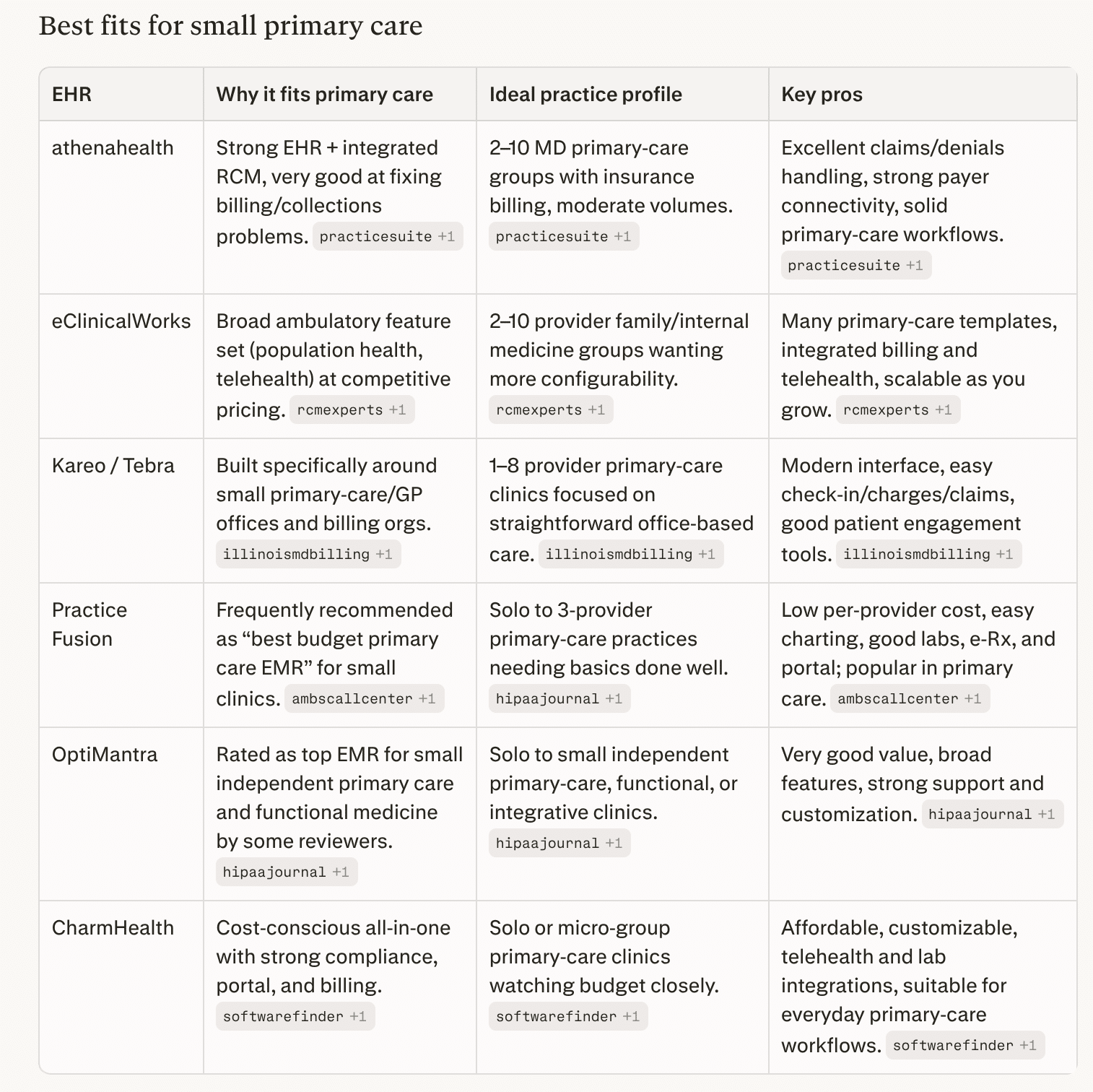
For small primary care practices (roughly 1–10 providers), common “short list” EHRs in 2026 are athenahealth, eClinicalWorks, Kareo/Tebra, Practice Fusion, OptiMantra, and CharmHealth. https://www.hipaajournal.com/best-emr-for-small-practices/
For a small primary‑care group, a practical path is:
-
If your main pain point is billing/collections → put athenahealth and Kareo/Tebra at the top of the demo list.
-
If you want maximum clinical depth and flexibility on a reasonable budget → look closely at eClinicalWorks.
-
If you’re very budget‑sensitive or solo/≤3 providers → trial Practice Fusion, CharmHealth, or OptiMantra and compare support and usability.
Then, script 3–5 real primary‑care scenarios (new patient, chronic follow‑up with labs and meds, wellness visit, a referral, and a denied claim) and make each vendor walk your team through those exact workflows before you decide.
best ehr for small practice
Why Not Epic?
Epic is excellent software, but for a small independent primary‑care practice it’s usually overkill in cost, complexity, and control compared with ambulatory‑focused cloud EHRs.
1. Cost and ROI profile
-
Full Epic implementations for mid‑size practices commonly run in the hundreds of thousands to millions over the first few years (licensing, build, hardware, training, interfaces).
-
Analyses comparing enterprise EHRs show independent 2–20 provider groups often save well over a million dollars over 5 years by choosing right‑sized cloud EHRs instead of Epic, with faster go‑live and no in‑house IT department.
-
Even Epic’s “small clinic” configurations or Garden Plot–style offerings are still far more expensive than typical per‑provider subscriptions from vendors aimed at small practices.
2. Complexity and fit for workflows
-
Epic is designed primarily for large integrated delivery networks, hospitals, and multi‑specialty organizations, with a huge number of modules, build options, and governance overhead.
-
Small primary‑care offices need fast setup, simple templates, and minimal configuration; enterprise‑grade build and change‑management processes can slow them down and add training burden.
-
Many advanced features (research tools, complex inpatient workflows, sophisticated analytics) go underused in a 1–10 provider primary‑care setting, so you pay for capability you rarely need.
3. Infrastructure, support, and dependence
-
Traditional Epic deployments assume either on‑premises or large hosted environments with dedicated IT and interface teams; even cloud‑hosted options still expect more technical and governance capacity than most small practices have.
-
If you access Epic through Community Connect, you’re tied to a host health system’s configuration, change schedule, and often their revenue‑cycle rules, which can limit autonomy and customization for your small practice.
4. When Epic can make sense for small practices
-
You’re tightly integrated with a local Epic hospital system and can join their Community Connect at a reasonable per‑provider rate, gaining seamless chart sharing and referrals.
-
You’re part of a larger physician network or MSO planning to scale well beyond “small practice” and willing to absorb higher cost and longer implementation for long‑term standardization.
For a typical independent primary‑care group, you usually get a better balance of price, speed, and usability from systems built for small ambulatory practices (athenahealth, eClinicalWorks, Kareo/Tebra, Practice Fusion, CharmHealth, OptiMantra, etc.).
Can I offer Patient Check-In with these smaller EHR systems?
Yes. Most of the small‑practice EHRs we discussed either have built‑in kiosk modes or APIs/workflows that a kiosk app can call for self check‑in. Epic of course has Welcome + Android and IOS
Built‑in kiosk / tablet check‑in
-
athenahealth: Offers Enhanced Self Check‑In embedded in athenaOne; staff can hand patients a practice‑owned device in the waiting room to complete digital forms, insurance capture, and questionnaires, and it plugs directly into the EHR/RPM.
-
eClinicalWorks: Has an iPad‑based eCW Kiosk that lets patients update demographics, sign consent forms, complete questionnaires, scan IDs/insurance, and make payments, with data written straight into eCW.
-
Kareo/Tebra: Provides a Kareo/Tebra Kiosk app for iOS that lets patients enter history, demographics, and forms digitally, with data integrated into the Kareo platform.
-
CharmHealth: Has a dedicated CharmHealth Patient Check‑In Kiosk / Charm Kiosk app for kiosks and tablets, supporting self check‑in, demographic and history updates, forms, and ID upload.
-
Practice EHR (another small‑practice system): Ships an iPad‑friendly self‑service kiosk module tightly synced with its EHR for intake and check‑in.
Practice Fusion and some others don’t have a branded kiosk app but support tablet‑based registration via their patient portal or PHR in the waiting room.
API / integration angle
-
athenahealth: Public REST APIs include appointment and patient‑check‑in workflows; their “Digital Check‑In” and “Checking In a Patient” APIs cover collecting/confirming demographics, insurance, forms, and then flipping status to checked‑in, which a custom kiosk front‑end can drive.
-
Other small‑practice EHRs: Many expose some combination of scheduling, patient, and forms APIs (or FHIR resources) or partner via device‑integration programs; independent kiosk vendors (e.g., Aila, etc.) highlight EHR‑agnostic, API‑first integrations for demographics, forms, insurance images, and payments into the practice’s core system.
So from a kiosk‑check‑in perspective, you’re not blocked by choosing a smaller ambulatory EHR: you can either use their native kiosk module (simplest option) or integrate your own kiosk UI against their appointment/patient APIs where available.
Bonus Section — HIPAA Software
For most small practices or health IT vendors, “best HIPAA software” usually means an all‑in‑one compliance platform plus a few secure communication tools.
All‑in‑one HIPAA compliance platforms
These help with risk analysis, policies, training, BAAs, and documentation.
-
Compliancy Group (The Guard) – Guided HIPAA program with coach, risk assessment workflow, policy templates, training, BAA tracking, and “Seal of Compliance.”
-
Accountable – Modern alternative focused on automation, centralized controls, evidence tracking, vendor/BAA management, and dashboards; good for small practices and startups.
-
ComplyAssistant – HIPAA‑focused GRC platform with risk registers, policy management, incident tracking, and vendor risk assessment; better fit once you’re more “organization‑scale.”
-
HIPAA One (via Accountable platform) – Security risk analysis and HIPAA management with structured workflows.
If you just need a structured HIPAA program for a small clinic, Compliancy Group or Accountable are often the most straightforward starting points.
Risk assessment tools and templates
-
Compliancy Group, Accountable, and ComplyAssistant all include guided risk assessment modules.
-
You can also use stand‑alone tools and templates (e.g., HIPAAtraining.net risk analysis tools, checklist suites) if you prefer a lighter‑weight approach tied into your own ticketing system.
HIPAA‑compliant messaging and communication
For secure texting, team chat, and patient messaging (often alongside your EHR):
-
OnPage – Secure messaging + critical alerting, with BAAs and strong audit trails.
-
TigerConnect – Widely used clinical team messaging platform for providers; encrypted messaging, auto‑delete, audit trails.
-
OhMD, Spruce, Klara – Blend secure chat with patient intake and engagement; good for small outpatient practices.
-
Chanty (HIPAA configuration) – Team collaboration with HIPAA‑ready controls.
How to pick for a small practice or kiosk vendor
-
If you’re a small clinic: prioritize a guided program (Compliancy Group or Accountable) plus a HIPAA‑compliant messaging tool your staff will actually use.
-
If you’re building kiosk/EHR products: look for a platform that supports multi‑entity oversight, vendor management, and ongoing evidence collection (Accountable, HIPAA One, ComplyAssistant, or a broader GRC tool like Sprinto/Vanta/Drata with explicit HIPAA support).
Epic Disadvantages (from LinkedIn)
Wayne Gillis — Healthcare Leader & Market CEO | Transforming Healthcare | MBA, RN-BA | Bridging Healthcare & Business for Operational Excellence | National Speaker Gallup, New Mexico, United States
We went live with Epic 18 months ago.
Our labor costs are up $400K per month.
Nobody told us this would happen.
We hired consultants to figure out why our operational costs exploded after Epic go-live.
They found 5 workflow problems costing us serious money.
Problem #1: Double Documentation
Nurses document the same vitals in 3 different flowsheets.
Time wasted per nurse per shift: 47 minutes
Cost across 400 nurses: $85K/month
Why? Epic has 6 places to document vitals. Nobody told us which one to use.
Problem #2: Inbox Overload
Our doctors get 240 Epic messages per day.
Time spent managing inbox: 2.1 hours daily
Cost across 120 physicians: $110K/month
Half the messages are system-generated alerts they can’t turn off.
Problem #3: Order Sets Nobody Uses
We built 340 order sets during implementation.
Order sets actually being used: 23
Doctors default to manual ordering because they can’t find the right order set.
Extra clicks per order: 8-12
Time wasted: 15 minutes per physician per day
Cost: $42K/month
Problem #4: Medication Reconciliation
Takes an average of 18 minutes per patient.
In our old system? 6 minutes.
Why? Epic’s med rec workflow has 14 required clicks. Our old system had 4.
Extra time across all admissions: $67K/month
Problem #5: Chart Review Takes Forever
Finding information in Epic takes 3x longer than our old EMR.
Doctors spend 25 minutes reviewing charts that used to take 8 minutes.
Why? Information is buried in 40+ different tabs.
Cost: $53K/month in physician time
Total monthly waste: $403K
Annual waste: $4.8M
This is AFTER we paid $47M for Epic implementation.
What we did about it:
Month 1-2: Workflow audit
Shadowed 40 staff members across all roles.
Documented every inefficient click pattern.
Month 3-4: Simplification
→ Reduced vital signs flowsheets from 6 to 1
→ Turned off 80% of automated alerts
→ Deleted 317 unused order sets
→ Rebuilt med rec to 6 clicks instead of 14
→ Created quick-access chart summary view
→ Trained power users to build basic reports
Month 5-6: Training refresh
Most staff never learned Epic properly during go-live chaos.
We did small-group training on the optimized workflows.
Results after 6 months:
→ Nurse documentation time: Down 35 minutes/shift
→ Physician inbox time: Down 1.3 hours/day
→ Chart review time: Down to 11 minutes
→ Med rec time: Down to 9 minutes
→ Monthly labor costs: Down $287K
We’re still $116K/month over our pre-Epic baseline.
But we cut the waste by 71%.
If you’re 12-36 months post go-live:
We’re now 24 months post go-live.
Labor costs are still higher than pre-Epic.
But we’ve reclaimed $287K per month in waste.
That’s $3.4M annually.
Just by questioning the workflows we were told were “best practice.”
Reference link — https://www.linkedin.com/posts/waynegillismba_we-went-live-with-epic-18-months-ago-our-share-7434314542228258816-8U2Y/