RHTP Funding for Rural Healthcare

RHTP Healthcare funding

Timely post by Olea Kiosks on RHTP — we like kiosks but CMS explicitly frames tech innovation to include improving access to remote care, data sharing, and cybersecurity, etc. The states decide where the money goes and they are given basic guardrails by the Feds.

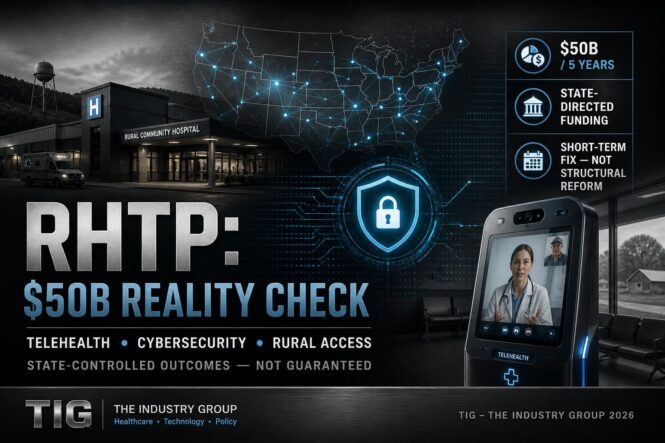
RHTP (the Rural Health Transformation Program; CMS also calls it the Rural Health Transformation (RHT) Program) is a huge, time-limited funding stream$50B over FY2026–FY2030, routed through state-led plans to improve access, workforce, technology, and care models.

Is RHTP “making up for shortfalls” in rural healthcare?

Partially at best—and not by itself.

  • What it can cover well (short-run):
    • Onetime or catalytic investments (telehealth capacity, IT/cybersecurity upgrades, care coordination infrastructure, workforce pipeline programs, regional partnerships). cms.gov
  • What it usually can’t “fix” alone (structural, ongoing):
    • Chronic operating losses driven by low volume, high fixed standby costs (ER/OB), payer mix, staffing costs, and the fact that rural systems often need permanent payment redesign more than short-term grants.
  • A key constraint: it’s temporary (5 years) and depends heavily on how each state designs and targets its plan—so results will vary a lot.

Is rural healthcare “on a path to doom”?

Not doomed—but on a high-risk trajectory without sustained reforms.  We see that with our healthcare in Oklahoma. Smaller hospitals squeezed out of operation.

  • Why it’s high-risk: rural systems face persistent workforce shortages, limited specialty coverage, and financial fragility; a 5-year program can stabilize and modernize, but it doesn’t automatically create durable revenue and staffing.
  • What would indicate it’s not on a doom path (watch these):
    1. States use RHTP to lock in sustainable access models (shared services/regional networks, right-sized service lines, reliable transfer pathways). 
    2. Workforce retention improves (not just recruitment) and scope-of-practice bottlenecks ease. 
    3. Payment approaches explicitly cover standby capacity (24/7 ED, obstetrics, EMS integration), so essential services aren’t funded like optional volume services. 

Because Congress/CMS set RHTP up as a state-led, state-tailored program rather than a single uniform federal operating subsidy.

  • Healthcare delivery is local: rural needs differ a lot (frontier vs. small-town, hospital-based vs. clinic-based, OB/EMS gaps, distance to tertiary centers), so states are allowed to target funds where their access failures are worst.
  • States control many “levers” that determine success: licensure and scope-of-practice rules, Medicaid policy choices, rate-setting approaches in some states, and how to organize regional networks and workforce programs—so CMS requires a state plan that aligns with those levers.
  • Medicaid is inherently a federal–state partnership: lots of rural financing flows through Medicaid, so the program is structured to run through state strategies and implementation rather than bypassing them.
  • Accountability and evaluation: the design uses state applications/plans, milestones, and reporting so CMS can compare approaches and adjust over time.
  • Net effect: the federal government provides funding + guardrails, while states decide who gets it, for what, and how it’s implemented, which is why outcomes will vary.

Our “Other Side of the Coin” POV

The blogpost is  partly accurate on the big picture (RHTP/RHT exists; it’s ~$50B/5 years; states run the subawards; “tech innovation” is a real strategic goal), but the post is not a reliable guide to what will be funded or what qualifies—it’s more of a vendor marketing piece aimed at steering RHT dollars toward kiosks.

Yes—odds are good that most states will put meaningful RHTP/RHT dollars into telehealth/technology-enabled care and cybersecurity/IT modernization, because those uses are explicitly contemplated under the program’s tech-focused goal and “major IT advances” language, and they’re broadly applicable across rural settings.

Caveat: the mix will still vary by state, and states may prioritize “telehealth that fills a clinical access gap” (behavioral health, specialty consults, remote monitoring) over generic video-visit expansion.

Follow the Money Applies?

What mega companies like UHC could realize

  • Indirectly (most likely): rural hospitals/clinics use RHT funds to buy services from vendors (telehealth platforms, care management tools, cybersecurity), or to stand up programs that incidentally reduce costs for all payers.
  • Directly (possible but uncertain):
    • If a state uses RHT funds for payments tied to care delivery through arrangements that include ACOs or similar entities, and UHC-affiliated groups participate. cms.gov
    • If a state competitively awards a contract to an Optum/UHC-related vendor for tech, analytics, care coordination, or security services (this is state procurement-dependent, not guaranteed by statute). cms.gov

What’s the best estimate right now?

Unknown / not publicly knowable in aggregate yet. CMS has not published a national breakdown showing how much will flow to specific companies like UnitedHealthcare; you’d have to track state award documents and contracts as they roll out.

What About Colorado As Example?

  • Colorado alone expects ~$200M in initial funding — a real test case for how states deploy RHTP dollars.
  • The program covers all 52 rural counties — but allocation decisions remain state-driven.
  • Colorado will get meaningful RHTP money — but whether it funds real access solutions or just spreads dollars thin across initiatives is still an open question.

How much Colorado gets (early signal)

  • Colorado expected ~$200M in the first year alone
  • Funding continues annually through 2026–2030 as part of the national $50B pool

👉 That lines up with our framing: ~$200M/year scale per state (ballpark, not fixed)


🧠 What Colorado is actually targeting

Colorado’s plan is not abstract — it’s pretty aligned with our post:

  • Coverage across 52 rural + frontier counties
  • Focus areas:
    • Telehealth / access expansion
    • Workforce shortages
    • Behavioral health integration
    • IT + system modernization

👉 That directly supports our thesis:  telehealth + cybersecurity + infrastructure = likely winners

What About Dispersion Between the States?

California didn’t do to good…
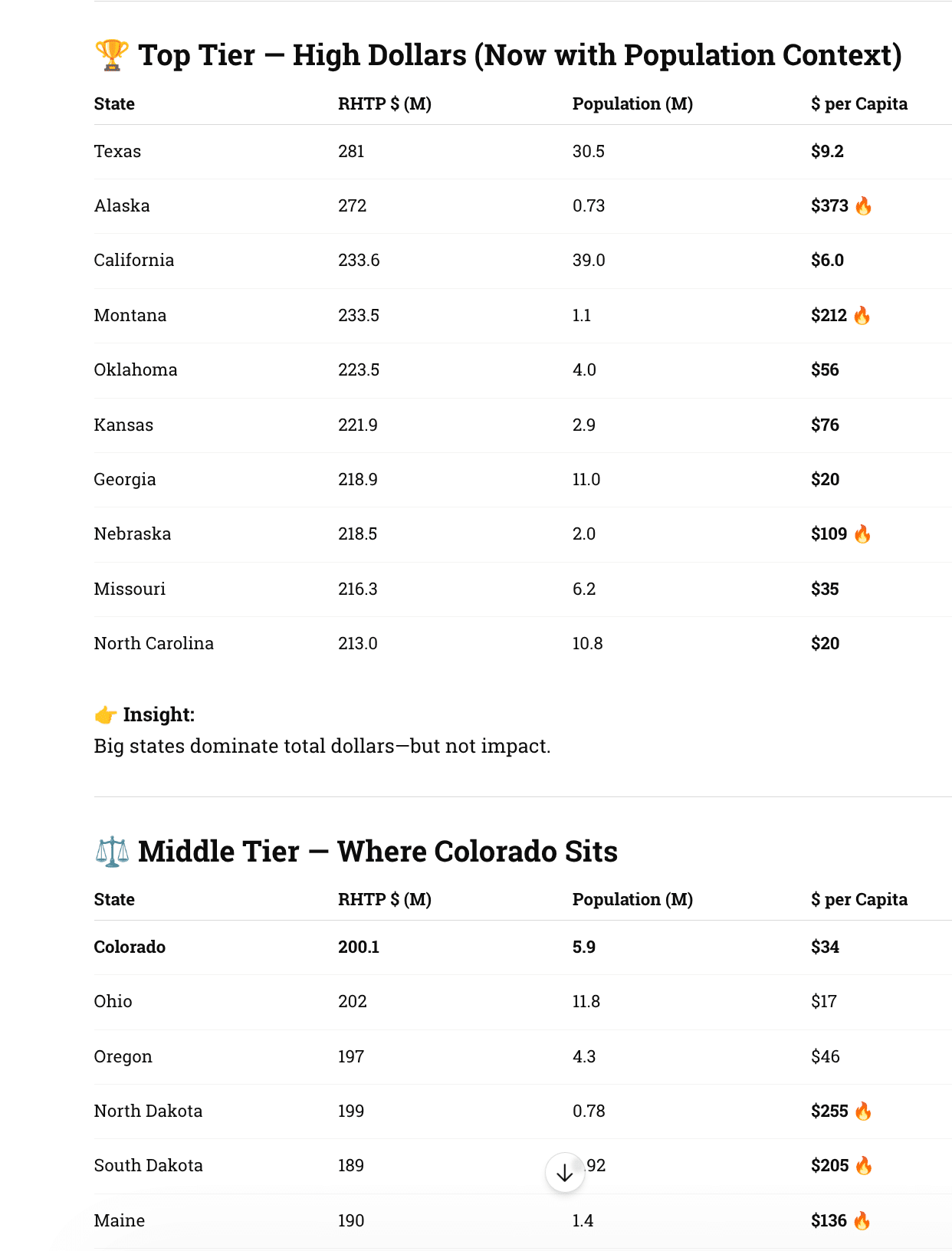
RHTP Dollars

More Data

RHTP_state_funding PDF

RHTP_state_funding CSV

Best States for Kiosk + Telehealth Deployment (RHTP Era)

🔥 Tier 1 — Prime Targets (High $ + Real Need + Execution Likely)

Texas

  • Massive funding + huge rural gaps
  • Strong hospital networks + private partners
  • Best for scale deployments (QSR-style rollout thinking)

North Carolina

  • Proven Medicaid innovation track record
  • Telehealth + behavioral health focus
  • High probability of structured, repeatable deployments

Georgia

  • Rural hospital closures = urgency
  • Aggressive modernization stance
  • Likely to fund access endpoints (kiosks, remote intake)

Tennessee

  • Strong health systems + rural stress
  • Known for pragmatic implementation
  • Good mix of funding + execution discipline

Tier 2 — High Impact / High ROI (Smaller States, Big $ per Capita)

Alaska

  • Extreme geography → telehealth necessity
  • Highest per-capita funding
  • Ideal for telehealth kiosks, remote diagnostics

Montana

  • Sparse population + high funding density
  • State likely to prioritize access infrastructure
  • Strong candidate for regional kiosk networks

North Dakota & South Dakota

  • Very high $/capita
  • Workforce shortages = automation opportunity
  • Best ROI per deployment (less competition, more impact)

Nebraska

  • High funding + centralized healthcare systems
  • Easier statewide coordination
  • Quiet but strong execution candidate

⚖️ Tier 3 — “Execution States” (Including Colorado)

Colorado

  • Solid funding (~$200M)
  • Covers 50+ rural counties
  • Outcome depends entirely on state decisions

👉 Your backyard insight:

  • Good for pilot programs + partnerships
  • Not guaranteed to scale without advocacy

Oregon

  • Progressive telehealth policy
  • Strong rural/urban divide
  • Good for behavioral + access kiosks

Minnesota

  • Mature healthcare systems
  • Likely to invest in coordinated care tech
  • Less flashy, more structured deployments

📉 Tier 4 — Lower Priority (For Now)

California

  • Huge dollars, but diluted impact
  • Complex procurement + bureaucracy
  • Hard to penetrate despite size

New York

  • Similar story: big money, slow execution
  • Focus on system-level reform vs endpoints

New Jersey, Massachusetts

  • Low rural need
  • Lower RHTP relevance
  • Less demand for kiosk/telehealth infrastructure

🧠 What Actually Drives “Best State” 

🎯 1. Funding Density (not total dollars)

  • Dakotas > Texas (per deployment ROI)

🏥 2. Rural Access Gaps

  • More gaps = more justification for kiosks/telehealth

⚙️ 3. State Execution Culture

  • North Carolina > California (in practice)

🤝 4. Procurement Reality

  • Some states fund pilots

  • Others fund deployments

The best states for kiosk and telehealth aren’t the ones with the most money —
they’re the ones with the most pressure to solve access problems and the ability to execute quickly.
Resources

Craig Allen Keefner

HIPAA 2026: Real vs Hype

HIPAA hype

What the Industry Is Saying — and What Healthcare Kiosk Operators Actually Need to Do

Overview

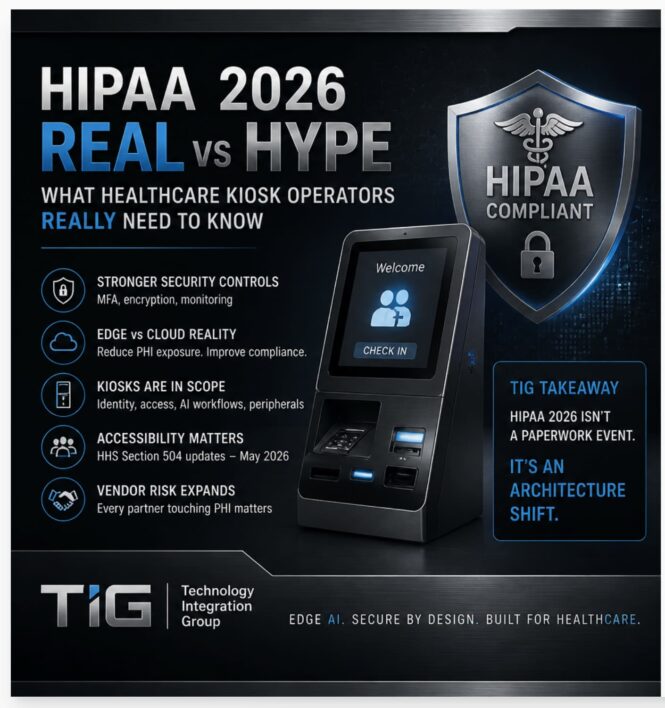
A recent sponsored article on HIPAA 2026 [Healthcare Dive] changes highlights real momentum around stronger cybersecurity—but like most vendor-driven guidance, it overstates urgency and understates operational reality. It is sponsored of course.

Bottom line:
HIPAA is tightening. But the real risk isn’t “missing a checkbox.”
It’s how PHI is processed across kiosks, edge devices, and AI workflows.


The Trigger: Cybersecurity Is Driving Change

The push behind HIPAA updates is simple:

  • Ransomware attacks are up
  • Healthcare is a top breach target
  • Legacy systems are everywhere

Regulators are responding by moving HIPAA from flexible guidance → enforceable controls


REAL vs HYPE

🔴 HYPE: “Major HIPAA changes hit in 2026 — act now or you’re non-compliant”

REALITY:
Most changes are still proposed, not finalized.

  • Final rule expected: ~2026 timeframe
  • Actual compliance deadlines: often 12–24 months later
  • HIPAA rules aren’t set by vendors or industry groups—they’re written and enforced by HHS (through OCR) using the federal rulemaking process.
    • HIPAA rules follow the federal rulemaking process:

      1. Law passed by Congress
        • Health Insurance Portability and Accountability Act (HIPAA) provides the foundation
      2. HHS proposes rules
        • Published as a Notice of Proposed Rulemaking (NPRM)
      3. Public comment period
        • Industry, vendors, hospitals weigh in
      4. Final rule issued by HHS
        • Becomes enforceable regulation

👉 You have time—but not unlimited time.


🔴 HYPE: “HIPAA 2026 is one big unified update”

REALITY:
There are multiple parallel tracks, not one rule:

  • Security Rule overhaul (cybersecurity)
  • Privacy Rule updates (patient access timelines)
  • CMS admin simplification rules

👉 Treating this as one project = planning failure


🔴 HYPE: “Compliance is mainly policies, audits, and documentation”

REALITY:
The shift is toward technical enforcement

Expect requirements around:

  • Multi-factor authentication (MFA)
  • Encryption everywhere (at rest + in transit)
  • Continuous monitoring and logging
  • Formalized risk analysis

👉 This is engineering + architecture, not paperwork


🔴 HYPE: “Cloud-based solutions simplify HIPAA compliance”

REALITY (critical for kiosks):
Cloud increases PHI exposure surface

Key risks:

  • AI models processing PHI off-device
  • API leakage / logging exposure
  • Third-party vendor chain risk

👉 For patient kiosks, this is the core issue.


🔴 HYPE: “Just upgrade your systems”

REALITY:
Healthcare runs on long lifecycle infrastructure

Typical environment:

  • 5–7 year kiosk deployments
  • Legacy OS versions
  • Peripheral dependencies (printers, scanners, payments)

👉 “Rip and replace” is rarely viable
👉 Retrofit strategy becomes essential


What This Means for Patient Kiosks

1) Edge AI becomes a compliance strategy—not just a performance choice

Processing PHI locally:

  • Reduces exposure
  • Simplifies compliance boundaries
  • Improves reliability

👉 This is the Edge AI vs Cloud AI divide in healthcare


2) Identity and access become front-and-center

Expect tightening around:

  • Patient authentication workflows
  • Staff/service access to devices
  • Session management on shared kiosks

👉 Kiosks are no longer “dumb endpoints”


3) Accessibility intersects with compliance

With HHS Section 504 updates (May 2026):

  • Accessible interfaces are no longer optional
  • Audio, tactile, and assistive workflows matter

👉 Compliance = security + accessibility


4) Business associate risk expands

Every vendor in the kiosk stack matters:

  • Software platforms
  • AI providers
  • Device management tools
  • Payment and ID verification

👉 Your vendor list = your risk surface


Perspective: Why This Matters Now

With the Kiosk Manufacturer Association (KMA) expanding its accessibility leadership—including the recent appointment of Matthijs Verhagen as Co-Chair of the Accessibility Committee—the focus is shifting from theory to deployment reality.

Key priorities emerging:

  • Standardized accessibility + security design
  • Device-level compliance frameworks
  • Practical retrofit pathways for existing deployments

👉 This is where industry guidance is heading—not vendor checklists


Practical Next Steps (Operator Checklist)

Instead of reacting to hype, do this:

✔ Audit your PHI flow

  • Where is data processed?
  • Edge vs cloud vs hybrid

✔ Inventory kiosk infrastructure

  • OS versions
  • Compute capability
  • Peripheral dependencies

✔ Map vendor exposure

  • Who touches PHI?
  • Where are contracts weak?

✔ Evaluate retrofit vs replace

  • Can existing kiosks support:
    • MFA
    • encryption
    • local AI inference

✔ Stress-test workflows

  • Patient check-in
  • ID verification
  • Accessibility interaction

TIG Takeaway

HIPAA 2026 is not a paperwork event.

It’s an architecture shift.

The winners won’t be the most “compliant” on paper—
they’ll be the ones who redesign how PHI moves through their systems.

For kiosks, that means:

  • Edge-first thinking
  • Lifecycle-aware upgrades
  • Accessibility built in—not added later
Craig Allen Keefner

Medical Diagnosis in Metro Station – In Shanghai

metro health

Imagine walking into a metro station, stepping into a booth and walking out four minutes later with a diagnosis, a treatment plan and your medication.

That’s happening in Shanghai today. Over 2,000 AI-powered medical kiosks, deployed across metro stations, shopping centres and underserved rural areas. They analyse your vitals, cross-reference 300 million patient records, generate a diagnosis and dispense medication.
24/7. No appointment needed.

Healthcare as frictionless as buying a coffee.

We talk a lot about convenience in customer experience, but we rarely push the definition far enough. Convenience isn’t just about making things faster for one person. It’s about designing systems that work at scale .
These kiosks reduce hospital crowding (which is a big issue in CHina). They bring care to communities the old system simply couldn’t reach.

In my opinion, this is what separates good CX from great CX. Good CX asks “how do we make this easier for one person?” Great CX asks “how do we make this work for everyone, everywhere, all the time?”

Nice post on Linkedin

Healthcare in Shanghai – Kiosks and AI

More info

What the healthcare shanghai kiosk does

  • It is a walk‑in booth that looks like a small clinic or vending machine, providing 24/7 primary‑care style service in malls, stations, and community areas.

  • Users register, describe symptoms by voice or touch screen, and the kiosk’s sensors capture vitals such as blood pressure, heart rate, temperature, and sometimes basic ECG.

AI and clinical workflow

  • The AI engine compares symptoms and vitals against a dataset reported at over 300 million prior medical consultations covering nearly 2,000 diseases to generate a preliminary diagnosis and treatment suggestion.

  • A licensed remote physician then reviews each case before any prescription or strong recommendation is finalized, so the kiosk functions as “AI‑first triage plus human sign‑off,” not a fully autonomous doctor.

Performance and impact

  • Reported figures from promoters claim around 95% diagnostic accuracy for the targeted set of common conditions, with roughly 70% reduction in waiting times and about 30% lower cost versus conventional visits for similar minor issues.

  • For Shanghai specifically, about 250 kiosks in the metro system alone are said to serve more than 15,000 people per month, turning what used to require a clinic visit into a 4‑minute interaction.

Where it fits in China’s system

  • These kiosks sit under China’s broader “Healthy China 2030” and healthcare‑digitization push, alongside self‑service registration/payment terminals and telemedicine stations in community clinics.

  • Their stated goals are to offload minor illnesses and basic triage from overcrowded public hospitals, extend access in under‑served areas, and standardize basic primary‑care workflows with AI support.


More healthcare shanghai Resources

Hardware and Software

Most units in Shanghai use a fairly standard medical‑kiosk stack: commodity x86/ARM (or domestic Phytium) box PC at the core, Windows/Linux‑class OS (often localized like Kylin), a sensor “chair” or pod for vitals, plus a cloud‑connected AI and telemedicine layer on top.

Hardware stack

  • Compute core: Industrial box PC (e.g., JHCTECH CNTI‑D2K1) with Phytium D2000 8‑core CPU or similar x86/ARM, fanless, designed for 24/7 operation, with multiple USB 3.0, USB 2.0, and RS‑232 ports and PCIe for camera/AI or extra I/O.

  • Vitals module: Integrated medical‑grade peripherals for blood pressure, heart rate, SpO₂, temperature, and sometimes weight/BMI; some deployments add simple ECG or glucose as options.

  • Identity and UX: 21–32″ touch display, ID/health‑card reader, QR scanner, receipt printer, cameras for facial recognition and video consults, mic/speakers or handset.

  • Optional dispensing: In “doctor‑in‑vending‑machine” variants, a refrigerated/locked cabinet with controlled drawers that dispense common OTC or basic prescription meds after remote doctor approval.

  • Connectivity and security: Ethernet plus 4G/5G modem, hardware watchdog, secure boot; boxes are designed to run hospital‑hours workloads in noisy, hot public environments.

Software and AI stack Healthcare Shanghai Kiosk

  • OS layer: Localized Linux (e.g., Kylin V10) or Windows IoT‑class OS, chosen to meet Chinese healthcare data‑security and “indigenous tech” requirements.

  • Edge apps: Kiosk middleware for device I/O (sensors, card readers, printer), session management, UI, and offline queueing if the cloud link drops.

  • AI engine: Cloud‑side medical models trained on over 300 million consultations and roughly 2,000 diseases; they fuse symptom input (touch/voice) with vitals to produce structured triage, differential diagnosis, and recommended orders.

  • Telemedicine services: Integrated video consult platform that routes cases to licensed doctors, presents the AI summary, and lets the doctor approve, modify, or reject prescriptions or referrals.

  • Integration: APIs into regional electronic health records and insurance platforms so visits can be logged, billed, and attached to the patient’s national ID/health ID.

Data, security, and operations

  • Data handling: Encrypted transmission of vitals, images, and consultation records to central data centers; logs kept to support auditability and post‑hoc QA of AI decisions.

  • Local‑first control: Hospitals or city health bureaus typically manage device fleets centrally (remote monitoring, software updates, content/policy pushes) using standard kiosk‑management tooling adapted for medical workloads.

  • Compliance focus: Vendors emphasize “fully localized” hardware/OS stacks and adherence to Chinese medical‑data standards to align with national self‑reliance and cybersecurity rules.

EHR

Shanghai does not run a single, branded EHR like Epic or Cerner; instead it uses a city‑wide health information exchange platform that links many hospital EMR systems into a shared regional record.

City‑level platform

  • Shanghai operates a municipal Health Information Exchange (HIE) that aggregates data from all tertiary hospitals and many district hospitals and community health centers into a unified longitudinal record for residents.

  • By 2016 this HIE covered 38 top‑tier hospitals, 6 district hospitals, and 40 community health centers and held records on roughly 39 million patients, including meds, imaging, encounters, and notes.

Hospital‑side EMR/EHR

  • Individual hospitals in Shanghai typically run their own EMR systems from domestic vendors (for example, products like the Lixiang Electronic Medical Record System or similar local platforms), which then feed standardized data into the city HIE.

  • National specifications from China’s National Health Commission define how hospital EMRs must structure and exchange data, so Shanghai’s “primary” record in practice is the regional cloud EHR built from these EMR feeds rather than one commercial EHR product.

Craig Allen Keefner

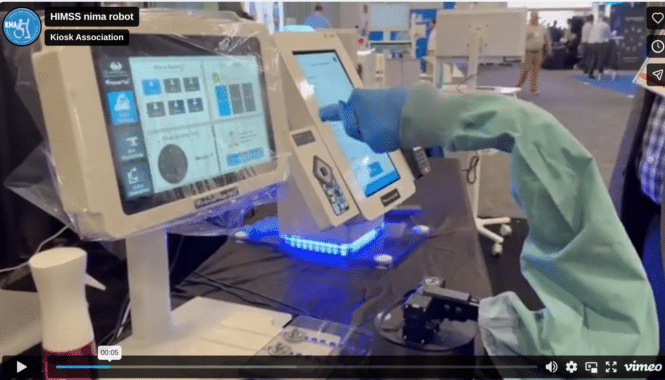
HIMSS Demo – Robot Teaching AI Gesture Recognition

Touchless Gesture at HIMSS

Touchless interaction in healthcare

What if a robot could help train an AI to understand human gestures?🤖🦾

At HIMSS 2026 in Las Vegas, we are showing a small demo that illustrates how we train the gesture recognition system behind HoverTap™ MD.

A user performs a simple hand movement. The robotic arm then mimics that motion. But the robot itself is NOT the goal! The idea is to capture real human gestures and then let the robotic arm repeat thousands of variations of those movements in front of HoverTap. This allows our AI models to continuously train and improve how the system understands gestures from different users.

It’s a simple demonstration, but it represents an important step toward reliable touchless interaction in healthcare environments.

If you’re attending HIMSS this week, come see it in action.

Craig Allen Keefner

Best EHR For Small Practice

best EHR for small primary care practices 2026

Which EHR for Small Practice

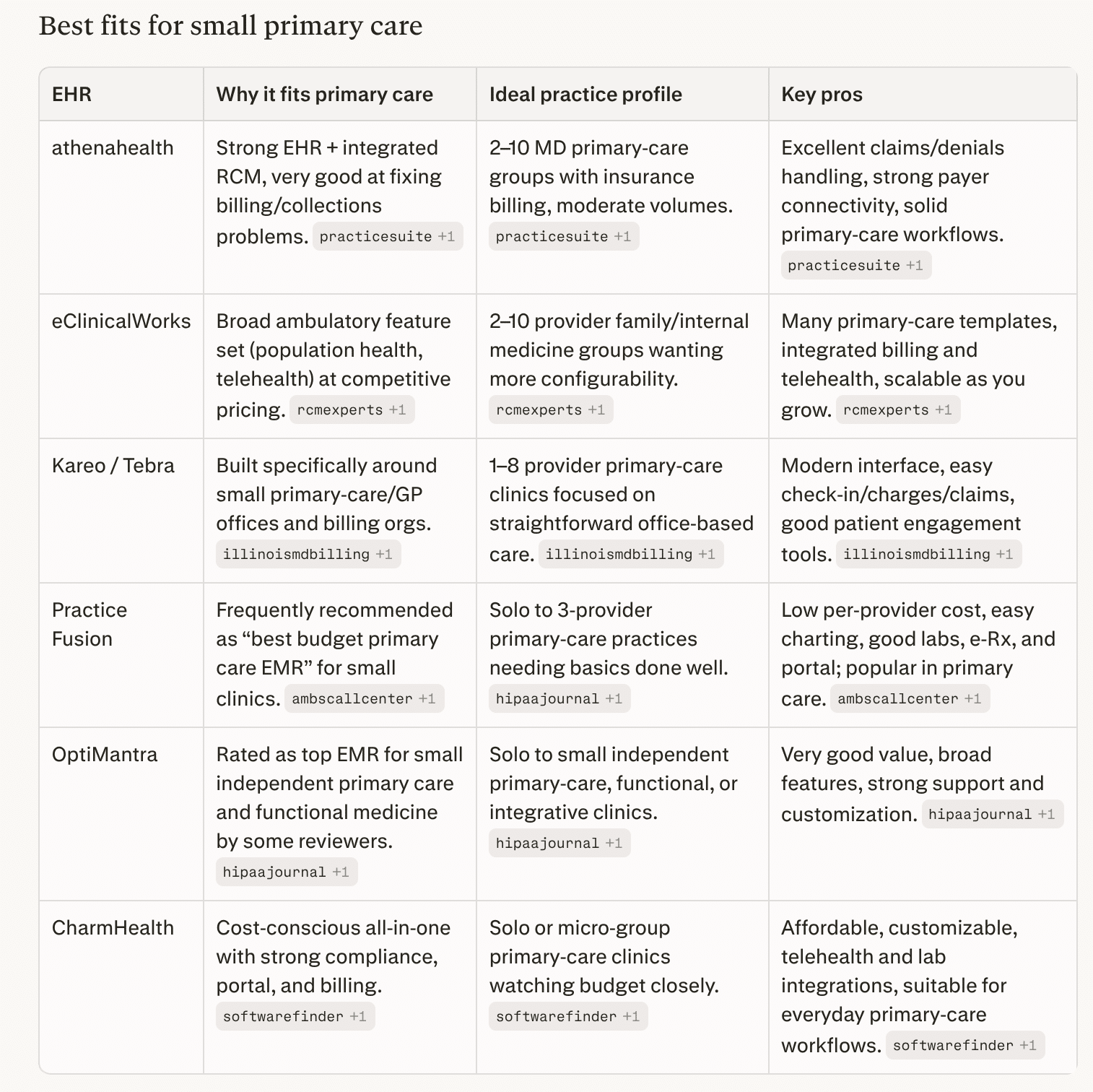
For small primary care practices (roughly 1–10 providers), common “short list” EHRs in 2026 are athenahealth, eClinicalWorks, Kareo/Tebra, Practice Fusion, OptiMantra, and CharmHealth. https://www.hipaajournal.com/best-emr-for-small-practices/

For a small primary‑care group, a practical path is:

  1. If your main pain point is billing/collections → put athenahealth and Kareo/Tebra at the top of the demo list.

  2. If you want maximum clinical depth and flexibility on a reasonable budget → look closely at eClinicalWorks.

  3. If you’re very budget‑sensitive or solo/≤3 providers → trial Practice FusionCharmHealth, or OptiMantra and compare support and usability.

Then, script 3–5 real primary‑care scenarios (new patient, chronic follow‑up with labs and meds, wellness visit, a referral, and a denied claim) and make each vendor walk your team through those exact workflows before you decide.

best ehr for small practice

best ehr for small practice

Why Not Epic?

Epic is excellent software, but for a small independent primary‑care practice it’s usually overkill in cost, complexity, and control compared with ambulatory‑focused cloud EHRs.

1. Cost and ROI profile

  • Full Epic implementations for mid‑size practices commonly run in the hundreds of thousands to millions over the first few years (licensing, build, hardware, training, interfaces).

  • Analyses comparing enterprise EHRs show independent 2–20 provider groups often save well over a million dollars over 5 years by choosing right‑sized cloud EHRs instead of Epic, with faster go‑live and no in‑house IT department.

  • Even Epic’s “small clinic” configurations or Garden Plot–style offerings are still far more expensive than typical per‑provider subscriptions from vendors aimed at small practices.

2. Complexity and fit for workflows

  • Epic is designed primarily for large integrated delivery networks, hospitals, and multi‑specialty organizations, with a huge number of modules, build options, and governance overhead.

  • Small primary‑care offices need fast setup, simple templates, and minimal configuration; enterprise‑grade build and change‑management processes can slow them down and add training burden.

  • Many advanced features (research tools, complex inpatient workflows, sophisticated analytics) go underused in a 1–10 provider primary‑care setting, so you pay for capability you rarely need.

3. Infrastructure, support, and dependence

  • Traditional Epic deployments assume either on‑premises or large hosted environments with dedicated IT and interface teams; even cloud‑hosted options still expect more technical and governance capacity than most small practices have.

  • If you access Epic through Community Connect, you’re tied to a host health system’s configuration, change schedule, and often their revenue‑cycle rules, which can limit autonomy and customization for your small practice.

4. When Epic can make sense for small practices

  • You’re tightly integrated with a local Epic hospital system and can join their Community Connect at a reasonable per‑provider rate, gaining seamless chart sharing and referrals.

  • You’re part of a larger physician network or MSO planning to scale well beyond “small practice” and willing to absorb higher cost and longer implementation for long‑term standardization.

For a typical independent primary‑care group, you usually get a better balance of price, speed, and usability from systems built for small ambulatory practices (athenahealth, eClinicalWorks, Kareo/Tebra, Practice Fusion, CharmHealth, OptiMantra, etc.).

Can I offer Patient Check-In with these smaller EHR systems?

Yes. Most of the small‑practice EHRs we discussed either have built‑in kiosk modes or APIs/workflows that a kiosk app can call for self check‑in.  Epic of course has Welcome + Android and IOS

Built‑in kiosk / tablet check‑in

  • athenahealth: Offers Enhanced Self Check‑In embedded in athenaOne; staff can hand patients a practice‑owned device in the waiting room to complete digital forms, insurance capture, and questionnaires, and it plugs directly into the EHR/RPM.

  • eClinicalWorks: Has an iPad‑based eCW Kiosk that lets patients update demographics, sign consent forms, complete questionnaires, scan IDs/insurance, and make payments, with data written straight into eCW.

  • Kareo/Tebra: Provides a Kareo/Tebra Kiosk app for iOS that lets patients enter history, demographics, and forms digitally, with data integrated into the Kareo platform.

  • CharmHealth: Has a dedicated CharmHealth Patient Check‑In Kiosk / Charm Kiosk app for kiosks and tablets, supporting self check‑in, demographic and history updates, forms, and ID upload.

  • Practice EHR (another small‑practice system): Ships an iPad‑friendly self‑service kiosk module tightly synced with its EHR for intake and check‑in.

Practice Fusion and some others don’t have a branded kiosk app but support tablet‑based registration via their patient portal or PHR in the waiting room.

API / integration angle

  • athenahealth: Public REST APIs include appointment and patient‑check‑in workflows; their “Digital Check‑In” and “Checking In a Patient” APIs cover collecting/confirming demographics, insurance, forms, and then flipping status to checked‑in, which a custom kiosk front‑end can drive.

  • Other small‑practice EHRs: Many expose some combination of scheduling, patient, and forms APIs (or FHIR resources) or partner via device‑integration programs; independent kiosk vendors (e.g., Aila, etc.) highlight EHR‑agnostic, API‑first integrations for demographics, forms, insurance images, and payments into the practice’s core system.

So from a kiosk‑check‑in perspective, you’re not blocked by choosing a smaller ambulatory EHR: you can either use their native kiosk module (simplest option) or integrate your own kiosk UI against their appointment/patient APIs where available.

Bonus Section — HIPAA Software

For most small practices or health IT vendors, “best HIPAA software” usually means an all‑in‑one compliance platform plus a few secure communication tools.

All‑in‑one HIPAA compliance platforms

These help with risk analysis, policies, training, BAAs, and documentation.

  • Compliancy Group (The Guard) – Guided HIPAA program with coach, risk assessment workflow, policy templates, training, BAA tracking, and “Seal of Compliance.”

  • Accountable – Modern alternative focused on automation, centralized controls, evidence tracking, vendor/BAA management, and dashboards; good for small practices and startups.

  • ComplyAssistant – HIPAA‑focused GRC platform with risk registers, policy management, incident tracking, and vendor risk assessment; better fit once you’re more “organization‑scale.”

  • HIPAA One (via Accountable platform) – Security risk analysis and HIPAA management with structured workflows.

If you just need a structured HIPAA program for a small clinic, Compliancy Group or Accountable are often the most straightforward starting points.

Risk assessment tools and templates

  • Compliancy Group, Accountable, and ComplyAssistant all include guided risk assessment modules.

  • You can also use stand‑alone tools and templates (e.g., HIPAAtraining.net risk analysis tools, checklist suites) if you prefer a lighter‑weight approach tied into your own ticketing system.

HIPAA‑compliant messaging and communication

For secure texting, team chat, and patient messaging (often alongside your EHR):

  • OnPage – Secure messaging + critical alerting, with BAAs and strong audit trails.

  • TigerConnect – Widely used clinical team messaging platform for providers; encrypted messaging, auto‑delete, audit trails.

  • OhMD, Spruce, Klara – Blend secure chat with patient intake and engagement; good for small outpatient practices.

  • Chanty (HIPAA configuration) – Team collaboration with HIPAA‑ready controls.

How to pick for a small practice or kiosk vendor

  • If you’re a small clinic: prioritize a guided program (Compliancy Group or Accountable) plus a HIPAA‑compliant messaging tool your staff will actually use.

  • If you’re building kiosk/EHR products: look for a platform that supports multi‑entity oversight, vendor management, and ongoing evidence collection (Accountable, HIPAA One, ComplyAssistant, or a broader GRC tool like Sprinto/Vanta/Drata with explicit HIPAA support).

Epic Disadvantages (from LinkedIn)


We went live with Epic 18 months ago.
Our labor costs are up $400K per month.
Nobody told us this would happen.

We hired consultants to figure out why our operational costs exploded after Epic go-live.

They found 5 workflow problems costing us serious money.

Problem #1: Double Documentation
Nurses document the same vitals in 3 different flowsheets.
Time wasted per nurse per shift: 47 minutes
Cost across 400 nurses: $85K/month
Why? Epic has 6 places to document vitals. Nobody told us which one to use.

Problem #2: Inbox Overload
Our doctors get 240 Epic messages per day.
Time spent managing inbox: 2.1 hours daily
Cost across 120 physicians: $110K/month
Half the messages are system-generated alerts they can’t turn off.

Problem #3: Order Sets Nobody Uses
We built 340 order sets during implementation.
Order sets actually being used: 23
Doctors default to manual ordering because they can’t find the right order set.
Extra clicks per order: 8-12
Time wasted: 15 minutes per physician per day
Cost: $42K/month

Problem #4: Medication Reconciliation
Takes an average of 18 minutes per patient.
In our old system? 6 minutes.
Why? Epic’s med rec workflow has 14 required clicks. Our old system had 4.
Extra time across all admissions: $67K/month

Problem #5: Chart Review Takes Forever
Finding information in Epic takes 3x longer than our old EMR.
Doctors spend 25 minutes reviewing charts that used to take 8 minutes.
Why? Information is buried in 40+ different tabs.
Cost: $53K/month in physician time

Total monthly waste: $403K
Annual waste: $4.8M
This is AFTER we paid $47M for Epic implementation.

What we did about it:

Month 1-2: Workflow audit
Shadowed 40 staff members across all roles.
Documented every inefficient click pattern.

Month 3-4: Simplification
→ Reduced vital signs flowsheets from 6 to 1
→ Turned off 80% of automated alerts
→ Deleted 317 unused order sets
→ Rebuilt med rec to 6 clicks instead of 14
→ Created quick-access chart summary view
→ Trained power users to build basic reports

Month 5-6: Training refresh
Most staff never learned Epic properly during go-live chaos.
We did small-group training on the optimized workflows.

Results after 6 months:
→ Nurse documentation time: Down 35 minutes/shift
→ Physician inbox time: Down 1.3 hours/day
→ Chart review time: Down to 11 minutes
→ Med rec time: Down to 9 minutes
→ Monthly labor costs: Down $287K

We’re still $116K/month over our pre-Epic baseline.
But we cut the waste by 71%.
If you’re 12-36 months post go-live:

We’re now 24 months post go-live.

Labor costs are still higher than pre-Epic.
But we’ve reclaimed $287K per month in waste.

That’s $3.4M annually.
Just by questioning the workflows we were told were “best practice.”

Reference link — https://www.linkedin.com/posts/waynegillismba_we-went-live-with-epic-18-months-ago-our-share-7434314542228258816-8U2Y/

Craig Allen Keefner

HIMSS 2026: The “Digital Front Door” Survival Guide

healthcare himss

Healthcare Digital Front Door

First Alerts — info good to know today —

Compliance: ADA, Section 504 (HHS), and HIPAA. (e.g., “How the Lobby Kiosks meet the May 2026 deadline”). Under HHS Section 504, kiosk compliance is service-based, not web-based. If a kiosk controls access to a federally funded healthcare service, the service must be accessible — regardless of the kiosk’s software architecture.

Learn more about HHS Section 504

For healthcare leaders evaluating compliant AI infrastructure, we’re discussing deployment frameworks during HIMSS 2026 in Las Vegas. #3461

For patient-facing kiosks handling PHI, edge inference should be the default architectural standard.  Interesting parallel example in self-order for kiosk which details Edge Inference method and the benefit for Cardholder Data Environment (PCI DSS). Making debut this week at EuroShop.

Let’s consider locations —

  1. The Lobby (highest traffic)

    • Arrival & Intake: Focusing on patient self-check-in and digital registrationThis is May 2026 HHS Section 504 accessibility deadline.

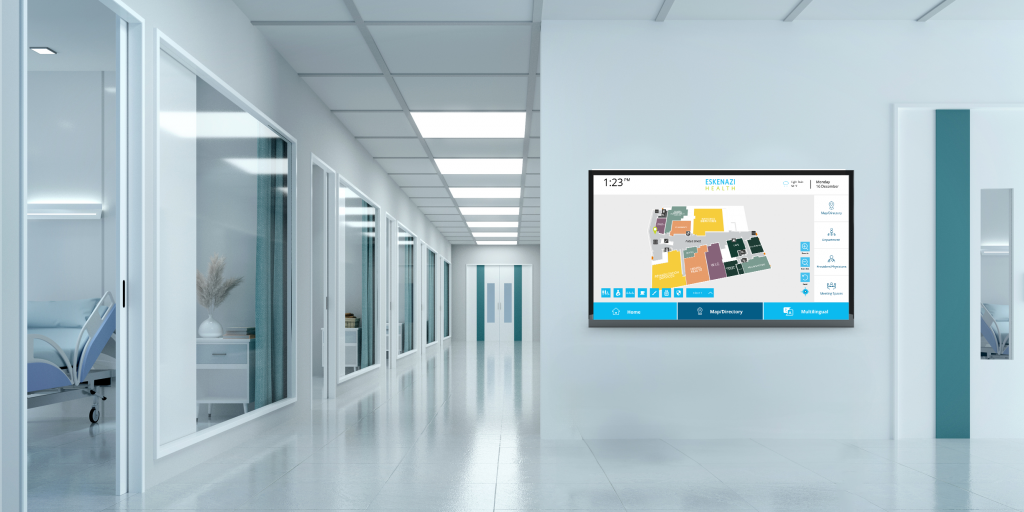
    • Wayfinding & Information: Using interactive digital signage and building directories to help people find their destination without needing to ask a staff member. Learn more about  digital signage wayfinding.

    • Pharmacy & Asset Management: Integrating smart lockers for secure prescription pick-up or temporary storage of patient belongings. Learn about Smart Lockers like Amazon Hub and Temperature Controlled Lockers.  Clothes and shoes for staff videos.

    • Security & Visitor Management: Using kiosks to print visitor badges and manage entrance security protocols.

  2. The Surgical/Clinical Suite (most technical/niche)

  3. The Parking/Exterior (most “modern infrastructure”)


Security-First Identity: The New Standard for Patient Intake

As healthcare organizations face record-breaking data breaches and rising medical identity theft, the “Digital Front Door” must evolve. Traditional identification methods—drivers’ licenses and social security numbers—are no longer sufficient. To protect Protected Health Information (PHI) and ensure patient safety, leading providers are moving toward a Zero-Trust Identity model at the point of entry.

Eliminating Fraud with Biometrics

Password-based systems and physical IDs can be shared, forged, or stolen. Biometric Patient Identification—including palm vein and advanced facial authentication—creates a link between the physical patient and their Electronic Health Record (EHR).

  • Privacy by Design: Modern biometric solutions store encrypted mathematical templates rather than raw images, ensuring patient privacy remains intact.

  • Fraud Prevention: Reduces the $17.4 billion annual cost of medical errors and fraud linked to patient misidentification.

  • Hygienic Interaction: Touchless and near-touchless sensors align with post-pandemic clinical requirements for sterile environments.

Solving the “Duplicate Record” Crisis

Duplicate records aren’t just a billing headache; they are a clinical risk. By performing a 1:N (one-to-many) search across the Master Patient Index (MPI) at the kiosk, hospitals can ensure every encounter is matched to the correct, singular identity.

  • Data Integrity: Prevent fragmented care by ensuring clinicians have the full patient history every time.

  • Workflow Efficiency: Reduce the administrative burden on front-desk staff by automating identity verification.

  • PRO TIP — Being asked to fill out 15 pages of questions is going to result in 15% accuracy since most patients will mark default in otder to get to end of forms/

EHR Handshaking aka somebody tell Epic or Cerner what is going on….

A self-service kiosk is only as powerful as its connection to the Electronic Health Record (EHR). For a truly frictionless experience, the kiosk must perform a secure, real-time “handshake” with platforms like Epic, Oracle Health (Cerner), and MEDITECH. This ensures that patient data isn’t just collected—it’s synchronized instantly with the clinical workflow.  Epic provides Welcome which is client loaded on check-in. Epic uses persistent queuing. It’s a key feature that prevents data loss if the kiosk loses connection during a “handshake.”

The Languages of Interoperability: HL7 vs. FHIR — To communicate with diverse hospital systems, kiosks utilize industry-standard protocols. Understanding which “language” your system speaks is critical for a successful rollout. Learn more about HIMSS 2026 Healthcare Technology for Self-Service

The Surgical & Clinical Suite: Precision in the Sterile Field

The Sterile Suite: Advanced Interfaces for High-Stakes Environments

In the operating room (OR), every second and every surface matters. Self-service and interactive technology in these zones must move beyond simple utility to prioritize infection control and uninterrupted clinical focus.

Touchless Control: Maintaining the Sterile Field — Traditional input devices like mice and keyboards are notorious vectors for bacterial transfer. To eliminate the need for repeated “scrubbing in,” modern surgical suites are adopting Vision-Based Gesture Control.

  • How it works: Surgeons use simple hand gestures (zoom, rotate, pan) to manipulate 3D medical models or radiology images without physical contact.

  • The Benefit: Reduces procedure time and maintains a strict sterile field, allowing the surgeon to remain focused on the primary task. ✋

Medical-Grade & Antimicrobial Displays –Standard displays cannot survive the aggressive disinfection protocols of a clinical environment. Surgical-grade touchscreens must meet specific engineering standards:

  • IP65/IP69K Ratings: Fully sealed enclosures that withstand high-pressure washdowns and chemical disinfectants (bleach, hydrogen peroxide) without liquid infiltration.

  • Glove-Compatible PCAP: High-sensitivity touchscreens that function flawlessly even when the user is wearing 5mm thick surgical gloves or when the screen is covered in fluids like saline.

  • Compliance: Look for IEC 60601-1 certification to ensure electrical safety and electromagnetic compatibility with sensitive medical equipment.

  • Learn about antimicrobial touchscreen wipes and coatings
  • Learn about Antibacterial Touchscreen wipes and coatings

The Parking & Exterior: Infrastructure for the Modern Campus

The Hospital Exterior: Extending Care Beyond the Front Door

A patient’s experience begins the moment they turn into the hospital parking lot. By integrating Smart Infrastructure, healthcare facilities can reduce “parking anxiety” and provide value before the patient even enters the building.

Hospital EV Charging: An Essential Amenity — Electric Vehicle (EV) charging is no longer just a “green” initiative; it is a critical patient and staff amenity.

  • For Staff: Level 2 chargers in employee lots help reduce range anxiety for nurses and doctors on long shifts, aiding in recruitment and retention. 🔌

  • For Patients: High-speed Level 3 (DC Fast) chargers in visitor lots provide a necessary service for those traveling from rural areas for specialized care.

  • The Revenue Opportunity: Integrated digital signage on charging kiosks allows for hospital branding, wayfinding, or local partnerships to offset infrastructure costs.

Outdoor Signage & Emergency Wayfinding — Hospital campuses are notoriously difficult to navigate. Outdoor Digital Wayfinding serves as an intelligent guide for anxious visitors.

  • Dynamic Messaging: Instantly update routes for emergency vehicle access or redirect traffic during surges.

  • High-Brightness Displays: Kiosks must feature 3000+ nits of brightness to remain readable in direct sunlight, with automatic dimming for nighttime use.

  • Durability: IP-rated, tamper-proof steel enclosures ensure 24/7 operation in extreme temperatures (from -30°C to 50°C).

The Unified Digital Campus

The transition to a Digital Front Door strategy is no longer optional; it is the prerequisite for modern care delivery. From the moment a patient enters the parking lot to the precision of the sterile surgical suite, self-service technology serves as the invisible backbone of the hospital.

  • Exterior: EV charging and dynamic wayfinding build immediate trust.

  • Lobby: Biometric identity and AI-driven intake solve the “Security-First” challenge while meeting the May 11, 2026 compliance deadline.

  • Clinical: Medical-grade, touchless interfaces protect the sterile field and enhance provider focus.

The Bottom Line: For the IT Directors and Clinicians at HIMSS, the message is clear: Hardware is the vessel, but Interoperability and Compliance are the anchors.

HIMSS 2026 Booth 3461 Resources

As we approach HIMSS 2026, the conversation around patient self-service has shifted from “digital novelty” to operational necessity. With widely reported staffing shortages and tighter margins, the question for leadership is no longer if you should deploy self-service, but how to do it without creating new liabilities.

Effective deployment in 2026 requires a focus on two non-negotiable pillars: Section 1557 Regulatory Compliance and Revenue Cycle “Shift Left” (aka getting payment/insurance sorted earlier in the process (at the kiosk) rather than chasing bills later.)

Arrange VIP Meeting at HIMSS 3461

Participants Booth 3461

Fast Facts

  • When: March 9-12, 2026 (Tue-Thu)
  • Where: Venetian Expo, Las Vegas
  • Pass Discount: Use Code BH29KIOS (Save before 2/8/26)
  • Our 2026 HIMSS Page
  • Floor Plan

The TIG Pavilion (Booth 3461)

Expert partners in 60601 certification, sterile interfaces, and patient ID.

NZTech Smart Touch & Touchless Interfaces for the OR.

Insight Touch 60601 Certified Touchscreens & Kiosks.

  • 15″ AIO & 21″ Medical Grade Monitors.

  • RS108 Rugged Tablet (10.1″).

BOCA Systems The standard in patient ID printing.

Storm Interface – assistive technology for tactile and audio

  • How Storm’s Assistive Technology Products work with JAWS Kiosk software to create an accessible and compliant kiosk experience.

FEC Kiosks

Must Visit!

[HIMSS 2026] The Patient Kiosk “No-Fail” Checklist

For IT Directors, Compliance Officers, and Patient Experience Leaders

  1. [ ] The Liability Audit (Section 504): Have you documented that your kiosks are service-accessible (WCAG 2.1 AA) rather than just “web-accessible”? Remember: The hospital holds the risk, not the vendor. Verify your indemnification today.

  2. [ ] The EHR “Persistent Queue”: Does your hardware-to-software “handshake” include persistent queuing? If a lobby Wi-Fi hiccup occurs during an Epic Welcome or Cerner check-in, ensure no patient data (or co-pay record) is lost in the void.

  3. [ ] The “Edge” AI Shield: If using LLMs or voice-assist, are you running Edge Inference? To maintain HIPAA integrity, PHI should be processed locally on the kiosk hardware, never sent to a third-party cloud for “learning.”

  4. [ ] The Identity Match (1:N): Are you still relying on SSNs or paper IDs? Transition to Biometric 1:N matching (Palm/Facial) to eliminate duplicate records at the source and slash the $17.4B annual cost of patient misidentification.

  5. [ ] Clinical/Exterior Durability: Is your hardware IEC 60601-1 certified for the clinical suite? Does your exterior wayfinding hit 3000+ nits for daylight readability? If it isn’t medical-grade, it isn’t hospital-ready.

This roadmap is provided by The Kiosk Association, a core initiative of The Industry Group (TIG)—the global leader in self-service technology research, standards, and advocacy.

The Industry Group (TIG) is the overarching self-service technology collective, providing global research and advocacy across kiosks, digital signage, and point-of-sale. The Kiosk Association is TIG’s dedicated healthcare and regulatory arm, serving as the central hub for the HMA (Hospitality), KMA (Kiosk Manufacturer), and PMA (Pharmacy) initiatives.

The Industry Group

The Industry Group


end of content

Craig Allen Keefner

Improving Patient Experience with Digital Signage and Wayfinding

A Path To Higher Hospital Star Ratings

June 5, 2025

“When I took my 81-year-old father to the doctor, and my mother-in-law to the hospital after Hurricane Helene, I was reminded how critical it is to understand the patient journey, and just how much pressure hospital staff are under to make that journey as positive and seamless as possible,” says Michael Dermont, healthcare solutions leader at Diversified. 

Michael uniquely understands the pressures healthcare providers face, not only from personal experience, but also because he sits at the intersection of technology, operations, and patient care. His role gives him a front-row seat to the challenges hospitals navigate daily as they strive to deliver compassionate, efficient, and connected experiences for every patient who walks through their doors. 

Healthcare facilities are constantly balancing the delivery of top-tier care with the need to maintain a strong Overall Hospital Quality Star Rating. That’s a lot to juggle, especially when the patient journey involves much more than the clinical care doctors and nurses provide. It begins the moment a patient schedules an appointment and extends through every interaction with the facility: parking, wayfinding, check-in, waiting areas, and follow-up care. 

Every step influences how a patient perceives their experience, and, ultimately, how they rate it. 

This is where thoughtful AV solutions, including digital signage and interactive wayfinding, make a measurable impact. When deployed effectively, these technologies reduce stress, improve communication, and support a more personalized and accessible experience, all of which contribute to higher Overall Star Ratings. 

What is an Overall Hospital Star Rating?

An Overall Hospital Quality Star Rating summarizes a variety of measures across 5 five areas of quality into a single star rating for each hospital. Published by the Centers for Medicare & Medicaid Services (CMS), these ratings help patients make informed decisions about where to receive care and encourage hospitals to improve performance in key areas. 

Improving Patient Experience with Digital Signage and Wayfinding Solutions

Derived from the HCAHPS (Hospital Consumer Assessment of Healthcare Providers and Systems) survey, this category reflects how patients perceive their hospital stay, from communication with caregivers to the environment and discharge process. These subjective experiences have a measurable impact on a hospital’s overall rating and reimbursement potential. 

Let’s take a look at the 10 HCAHPS evaluation measures and how AV solutions like digital signage and wayfinding can help improve patient experience ratings. 

  • Patients who reported that their nurses communicated well 
    • Digital displays can reinforce care team roles, provide real-time staff introductions, and display updates to reduce confusion.  
  • Patients who reported that their doctors communicated well 
    • Digital signage solutions can support video messages, real-time Q&A sessions, or translate critical information for better comprehension.
  • Patients who reported that they received help as soon as they wanted 
    • Digital request kiosks, smart call systems, and real-time status boards can reduce response times and set clear expectations.
  • Patients who reported that the staff explained medications before giving them 
    • Interactive content and medication education screens can supplement in-person conversations and support understanding.
  • Patients who reported that their room and bathroom were clean 
    • Digital signage can display cleaning schedules or allow patients to request additional cleaning, promoting peace of mind.
  • Patients who reported that the area around their room was quiet at night 
    • AV-controlled ambient soundscapes or noise-level reminders can help maintain a calm, healing environment.
  • Patients who reported that they were given information about what to do during recovery at home 
    • Discharge instructions displayed visually and interactively, via in-room screens or mobile integrations, support better retention.
  • Patients who understood their care when they left the hospital 
    • Digital summaries, visual care timelines, and checklists help patients feel more confident in their aftercare plan.
  • Patients who gave their hospital a rating on a scale from 0 (lowest) to 10 (highest) 
    • A streamlined, reassuring patient journey, is enhanced by clear digital signage and intuitive wayfinding solutions such as interactive kiosks, mobile wayfinding, and real-time directional displays. These solutions help family and visitors get where they need to go easily while reducing the workload of busy hospital staff.
  • Patients who would recommend the hospital to their friends and family. 
    • When patients feel informed, respected, and confident in their care, they’re more likely to share positive word-of-mouth. 

“When I think about healthcare, we need to focus on the patient experience. How does technology impact the patient in the room? What was it like for the family to get information?” Michael of Diversified adds. 

Improving patient experience involves more than just bedside manner, it requires consistent, thoughtful engagement throughout the care journey. Tools like digital signage, interactive wayfinding, interactive patient engagement systems, and real-time communication displays can reduce confusion, alleviate stress, and empower patients with the information they need, when they need it most. 

improving patient experience

Diversified and 22Miles: Partnering to Deliver Tailored AV Solutions That Boost Patient Experience and Hospital Star Ratings

To meet the complex needs of healthcare providers striving to improve patient experience and elevate their Overall Hospital Quality Star Ratings, Diversified has partnered with 22Miles, the leader in advanced digital signage and interactive wayfinding solutions. This collaboration combines Diversified’s deep expertise in AV systems integration with 22Miles’ innovative software platform to deliver highly customized solutions designed specifically for healthcare environments. 

Key examples of how Diversified and 22Miles solutions improve patient experience include: 

Interactive Wayfinding Kiosks and Mobile Navigation 

Simplifying the patient journey from parking lots through complex hospital layouts, these solutions reduce patient and visitor anxiety by providing real-time, step-by-step directions accessible on both large touchscreens and mobile devices, improving perceptions of timely and effective care.  

Importantly, these wayfinding systems are designed with full ADA compliance in mind, incorporating accessibility features such as screen reader compatibility, tactile buttons, and voice guidance to support patients with diverse abilities. 

Dynamic Digital Signage for Staff Communication 

Displays that introduce care teams, share important messages, and provide appointment reminders foster transparency and help patients feel more connected to their caregivers, directly impacting HCAHPS measures related to nurse and doctor communication.  

These solutions also help reduce staff burnout by streamlining communication and minimizing repetitive inquiries, allowing staff to focus more on patient care. 

Patient Education and Medication Information Displays 

Interactive screens in patient rooms offer tailored content about medications, care instructions, and discharge procedures, empowering patients to better understand their treatment and aftercare, which supports improved recovery and reduces readmission rates. 

These displays are also accessible, offering features such as adjustable text size, high-contrast modes, and multilingual support to meet ADA standards and ensure all patients receive clear and comprehensible information. 

Beyond ROI: How ROO is Reshaping the Way Healthcare Measures Success

At InfoComm 2025, Michael Dermont, Healthcare Solutions Leader at Diversified, spoke with Tomer Mann, CRO at 22Miles, about the impact of AV solutions on patient satisfaction and hospital performance. When the conversation turned to traditional Return on Investment (ROI) metrics, Mann introduced a more meaningful framework for healthcare: Return on Objectives (ROO).

“In healthcare, success isn’t just measured in dollars — it’s measured in outcomes that align with patient well-being and operational excellence,” said Mann. “When digital signage contributes to a calmer, more informed patient experience that raises a hospital’s STAR Rating, that’s the true return: ROO.”

This concept is especially important in the context of the Overall Hospital Quality Star Rating, which reflects a facility’s performance across key areas, including communication, cleanliness, and discharge preparedness. These ratings go far beyond financials — they represent how well a hospital supports the full patient journey.

As Mann emphasized, “If digital experiences can help a hospital earn a higher STAR Rating by improving communication and reducing confusion, that’s a direct and measurable return on objectives, and it can be transformational for the facility and everyone it serves.”

By leveraging the combined strengths of Diversified’s integration expertise and 22Miles’ robust platform, hospitals gain an end-to-end AV ecosystem tailored to their unique workflows and patient needs. This collaboration helps healthcare providers not only meet but exceed CMS quality benchmarks, leading to higher STAR ratings, improved reimbursements, and most importantly, a better experience for patients and their families.

As Michael Dermont, emphasizes, “Technology isn’t just about gadgets — it’s about truly understanding and supporting the patient journey. Our partnership with 22Miles helps us deliver AV solutions that reduce stress and empower patients, which directly translates to higher satisfaction and better star ratings.”

Interested in improving your hospital star rating with digital signage solutions? Book a demo today.

Improving Patient Experience with Digital Signage and Wayfinding: A Path to Higher Hospital Star Ratings 

Craig Allen Keefner

Epic Lawsuit by Texas AG Paxton

Texas AG is suing Epic

Texas Attorney General Ken Paxton files an antitrust and consumer protection petition alleging that Epic maintains monopoly power. It says that Epic controls more than 90% of US patient records, locks in hospitals through extreme switching costs, restricts competitor access to data, and imposes no-hire restrictions on employees.

The petition also argues that Epic delays or limits access to medical records for providers and patients who are outside Epic’s system.

The lawsuit further accuses Epic of misleading Texas children’s hospitals about its parental access rules, which is likely the key issue of the lawsuit.

The lawsuit seeks injunctive relief to restore competitive conditions, civil fines, and court costs.

Craig Allen Keefner

Patients Using AI to beat AI Medical Claim Denials

patient versus insurance company AI battle

Can I use AI to Appeal Medical Claim Denial?

Short answer is yes.  Over 20% of medical claims are denied (ACA marketplace denial rate is ~19% (CMS). 73 million in-network claims in 2023 were denied. And less that 1 percent appealed.

Insurers increase margins through claim-denial workflows.  We are being diplomatic.

AI in healthcare medical claims is very lightly regulated. Generally there is supposed to be real person reviewer and evaluate but how often do they simply sign off on the AI denial.

Some insurer AI systems evaluate likelihood of patient follow-through, raising fairness concerns. Again, diplomatically said.

Are there online companies that use AI to help me fight AI?

Yes, several online companies now use AI to help individuals appeal denied medical claims, making the process faster and more accessible than traditional methods. These services typically generate personalized appeal letters using your specific situation, policy details, and medical records, saving you hours of research and drafting.​

Leading AI Medical Claim Appeal Services

  • Fight Health Insurance offers a free, AI-based tool where you can upload your denial letter and relevant documents. The system then generates a comprehensive appeal letter tailored to your requirements.​
  • Claimable is another service that focuses on AI-generated, personalized appeals. Their process involves a detailed questionnaire and yields evidence-backed letters for a flat fee of about $40 per appeal. This platform specializes in medication-related denials but is expanding its coverage.​
  • Counterforce Health is a nonprofit platform that provides free, AI-based appeal letters for a variety of health claim denials. It can also automate follow-up calls with insurers to reduce the administrative burden for patients.​
  • PenguinAI and Aegis Health are geared more towards clinics and healthcare providers but use similar AI-driven technology to automate the appeal and denial management process.​

What to Expect

  • These platforms ask you to upload your denial letter and any supporting documents.
  • Their AI reviews your case, matches evidence from medical literature and policy regulations, and crafts a multi-page appeal letter.​
  • Some, like Counterforce Health, also use AI to make automated follow-up calls to insurance companies.​
  • Experts generally recommend having a human review the AI-generated letter before submitting, to ensure accuracy and completeness.​

This new generation of AI-powered services can be an effective first step in contesting denied claims, saving you time and increasing your chances of success.

What is the Cost?

The cost of AI-powered medical claim appeal services varies depending on the company:

  • Claimable charges a flat fee of about $40 per appeal, regardless of the outcome. There may be additional charges for shipping the letter if you want them to send it directly to your insurer or regulators.​
  • Counterforce Health provides its AI appeal service completely free to patients, made possible through grants and nonprofit backing.​
  • Fight Health Insurance also offers a free tool where users upload their denial and receive a personalized appeal letter.​
  • Some platforms offer the ability to print or fax appeals for a small fee (for example, $5 for direct faxing or document mailing).​

What About Next Steps and Insurer Reply/Rebuttal?

Most paid services charge a simple per-appeal flat fee rather than ongoing subscriptions or percentages of recovered amounts. Free options are expanding, offering significant value for patients needing help with the appeals process.

Most AI-powered appeal services do not typically handle direct, ongoing conversations with your insurer once you have submitted the appeal. Their main service is generating and preparing your initial appeal letter; after that, you are responsible for sending it in and managing the responses.​

However, one notable exception is Counterforce Health, which introduces an AI assistant called Maxwell. Maxwell can make follow-up phone calls to insurance companies, request updates, check the status of appeals, and document responses. This reduces the patient’s need to repeatedly call or navigate phone systems. Still, this level of automated follow-up is unique to Counterforce Health, and most other services focus strictly on document generation rather than real-time communication or negotiation with insurers.​

In summary, if you want a service that helps automate insurer follow-up and status calls—not just generating appeal letters—Counterforce Health is currently your best bet among AI-powered platforms.

Frequently Asked Questions

Can I use AI to appeal a denied medical claim?

Yes. Several AI platforms can generate personalized appeal letters based on your denial letter, policy details, and medical documentation. These tools simplify the appeal process and often increase the chances of success.

Are AI-generated appeal letters effective?

They can be very effective, especially when the denial is tied to policy wording or incomplete documentation. Experts still recommend having a human review the AI-generated letter for accuracy before submitting.

Is it legal to use AI to fight insurance denials?

Yes. Patients are legally allowed to create their own appeal letters, whether written manually or produced with AI. These tools do not replace legal advice—they simply help organize and draft needed documentation.

How much do AI appeal services cost?

Prices vary: Claimable charges around $40 per appeal, Counterforce Health offers a free nonprofit option, and Fight Health Insurance also provides a free AI tool. Some services may add small fees for mailing or faxing.

Do AI services submit the appeal for me?

Most services only generate the letter; the patient submits it. Counterforce Health is an exception—their AI assistant “Maxwell” can place follow-up calls to insurers and monitor status.

Do AI tools help with follow-up after the appeal is submitted?

Most tools do not offer follow-up. Counterforce Health is currently the only platform providing automated insurer phone-call follow-up.

Do I need to upload my denial letter?

Yes. All major AI appeal platforms require your denial letter so they can analyze the insurer’s rationale and reference the correct policy language.

Are AI appeal tools safe to use with medical information?

Reputable services follow HIPAA-compliant data handling practices, but patients should always review the platform’s privacy policy before uploading sensitive documents.

Can AI help with prior authorization denials?

Most tools can handle both claim denials and prior authorization denials. Some services, such as Claimable, specialize in medication-related issues.


Resources

Craig Allen Keefner

Epic Goes AI with AI Scribe

EPic AI Scribe

AI Scribe by Epic

Next week is the UGM? Look for the announcement. Why does it take so long to switch from Cobol or perhaps MUMPS? It is always amazing to us the resistance to efficiency that institutions have. Banks, restaurants, and airlines still running on Windows 97 e.g.  Why do I have to type so much stuff?  Try checking in with EpicHealth for Optum.  Exhausted 20 minutes later.

Epic did not make a formal public announcement of a new Scribe AI product yesterday, but multiple credible sources report that Epic is prepping the launch of its own proprietary AI scribe this month, and it is considered imminent. The most recent coverage from August 11, 2025, states Epic is “reportedly prepping to launch its own AI scribe,” which is set to shake up the health tech market currently dominated by startups like Abridge and Nuance.politico+2

Key context:

  • Epic’s AI scribe will automatically transcribe doctors’ notes during patient visits, aiming to reduce clinicians’ documentation burden.beckershospitalreview+1

  • Epic previously partnered with ambient scribe vendors (Microsoft/Nuance, Abridge) but is now joining other top EHR vendors (Athenahealth, Oracle) in developing an in-house scribe tool.politico+1

  • Market watchers and participants (HIStalk, Axios) expect the full official announcement soon, possibly at Epic’s User Group Meeting (UGM) in August.histalk2+1

  • Many industry commentators believe Epic’s vast data resources and integration advantage will quickly give their scribe product a competitive edge, even if initial functionality is basic.histalk2

No Epic press release or official post dated August 10 or 11 is referenced, but coverage from Axios, HIStalk, and Politico confirms that the product’s announcement is both widely anticipated and considered imminent. If you require the full Epic press release or a direct statement, it has not yet been located in major news sources as of August 11, 2025.

The Epic User Group Meeting (UGM) in August 2025 is scheduled for August 18–21, 2025 at Epic’s Verona, Wisconsin campus.caregility+3

This annual event gathers healthcare professionals, executives, directors, and clinicians to exchange insights, learn about new Epic software features, and share best practices. Most announcements and major sessions—including any anticipated launches such as Epic’s proprietary Scribe AI—traditionally occur within these dates, with the opening day often featuring keynote addresses and the official unveiling of new products.

Has Epic Done This Before?

1. Laboratory Information Systems: Beaker Module

  • Partnership history: Historically, Epic partnered with standalone lab vendors (like Sunquest, Cerner, and interfaced with reference labs) for laboratory information systems (LIS).

  • Epic’s own module: In the late 2000s, Epic began developing its Beaker modules (Clinical Pathology and Anatomic Pathology), offering hospitals an Epic-integrated LIS to replace those third-party solutions.academic.oup+3

  • Effect: The release of Beaker allowed clients to leverage tight integration with Epic’s EMR, reducing interfaces, costs, and reliance on external lab vendors.

2. Telehealth: Telehealth Anywhere & Video Visits

  • Partnership history: Epic originally partnered with external telehealth platform providers, such as Twilio and other major telehealth vendors, embedding their platforms for video visits directly into Epic workflows.beckershospitalreview

  • Epic’s own module: Epic later began offering its own “Telehealth Anywhere” platform and native video visit tools, deeply integrated into its EMR and scheduling systems—reducing the need for third-party telehealth software.epic+1

  • Effect: The new Epic-native telehealth features allowed health systems to keep more workflows inside Epic, simplifying integration and offering new fee structures.

3. Ambient AI Scribe & Clinical Documentation

  • Partnership history: Epic previously partnered with Nuance (Microsoft) and Abridge for clinical documentation and ambient scribe functionalities within its EMR.blogs.microsoft

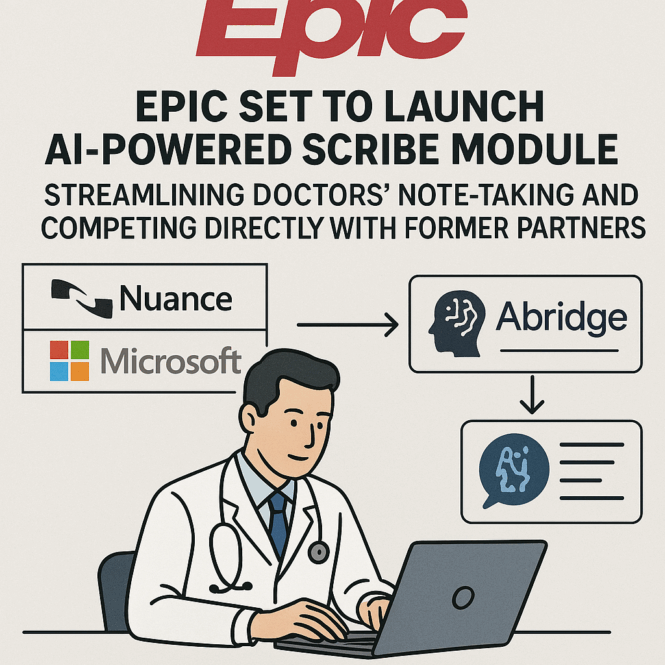
  • Epic’s own product: Epic is now poised to launch its own AI-powered scribe module, streamlining doctors’ note-taking and competing directly with former partners.

4. Payer Platform (Insurance Connectivity)

  • Partnership history: Epic’s environment enabled data connections and integrations with payer platforms and startups (like Particle Health) for insurance and care management use cases.medicaleconomics

  • Epic’s own module: Epic eventually released its own Payer Platform module, competing directly in the space and becoming dominant due to its integration advantage.healthapiguy.substack+1


Strategic Patterns

  • Epic’s strategy is often to observe successful “adjacent” vendor offerings, initially integrate those via partnerships, and then build competing in-house modules that offer deeper Epic native integration.healthapiguy.substack+2

  • This approach allows Epic to expand its software footprint, reduce reliance on third parties, and extract more value from its existing client relationships.


Noteworthy Partnership-Endings

  • The Xtenity partnership with Philips in the mid-2000s aimed to create a scaled-down Epic offering for mid-sized organizations, but ended abruptly—with Epic hiring the team and taking the product development in-house.clinfowiki+1

  • Multiple ambient and telehealth integrations with Microsoft/Nuance, Abridge, and Twilio are now being reevaluated in favor of Epic-native solutions.blogs.microsoft+1


In summary, Epic’s history is marked by an initial willingness to partner, followed by a long-term preference to develop native modules that eventually compete with, and often overshadow, those third-party solutions. This pattern has repeated in laboratories, telehealth, clinical documentation/scribes, and payer platforms.

More EPIC AI

Craig Allen Keefner